ASRock AMD BC-250
Ex-crypto-mining board from ASRock with a cut-down PS5 APU (6 Zen 2 cores, 24 RDNA 2 CUs, 16 GB GDDR6). With Linux it becomes a cheap gaming PC.
Support status
Abandoned by the manufacturer
An industrial board never sold to consumers. Neither ASRock nor AMD offers support or new BIOS releases. The latest known stock BIOS is P5.00. Linux support (Mesa, kernel) is community-driven.
- Manufacturer
- ASRock
- Released
- 2021
- Last official firmware
- P5.00
- Servers
- Works without servers
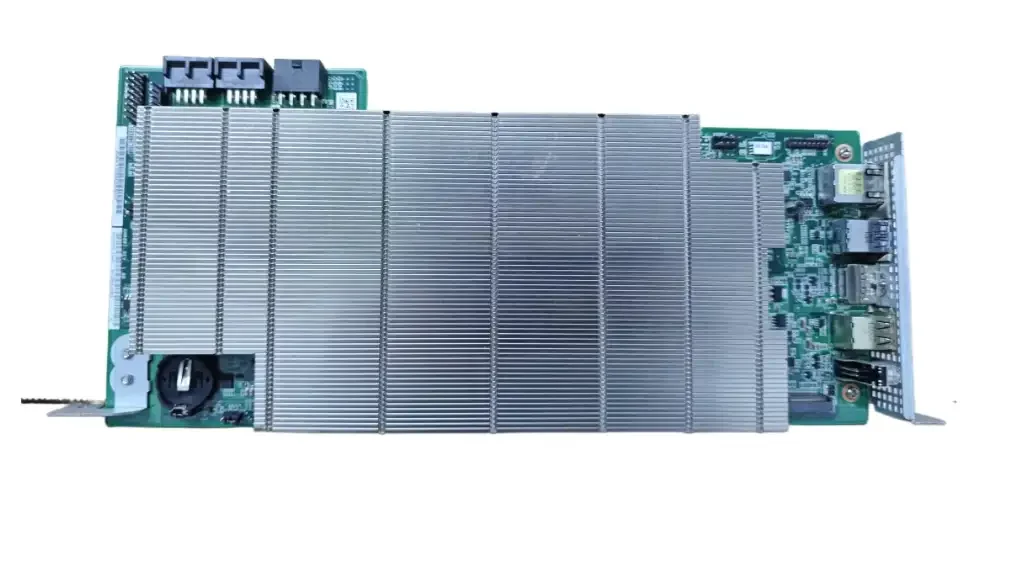
Overview
The AMD BC-250 is a board ASRock built for crypto mining around 2021–2022. Several boards sat together in a 4U rack chassis (ASRock 4U12G). On the board sits a cut-down version of the PlayStation 5 APU (CPU and graphics on one chip): 6 Zen 2 cores, 24 RDNA 2 compute units (CUs) and 16 GB of shared GDDR6 memory.
When mining ended, the boards hit the second-hand market. In 2021 they sold for around $500 on eBay; later often for $100–150 (Tom's Hardware).
Why it matters now: since Mesa 25.1 (2025) Linux supports the graphics, so the board can become a cheap gaming PC or "Steam console" running, for example, Bazzite. Performance is roughly that of a Radeon RX 6600 or GTX 1660 Ti. Cyberpunk 2077 runs at around 40 fps at 1080p on medium/high settings.
But it is a project, not a finished computer:
- Linux only. Windows has no driver for the graphics.
- No hardware video decoding.
- Passive heatsink: you have to add fans.
- No power button and no standard ATX connector: you need a PSU with an 8-pin PCIe cable.
- No warranty and no support from ASRock or AMD.
The link to the PS5 is explained under Hardware. Modded BIOS and unlocking more cores are under Jailbreak.
Hardware
Specifications
| Part | BC-250 |
|---|---|
| CPU | 6 Zen 2 cores / 12 threads, about 3.5 GHz (8 cores on the die) |
| GPU | RDNA 2, 24 CUs, codename Cyan Skillfish (gfx1013). Locked at 1500 MHz without a governor, up to 2000–2230 MHz with one |
| Memory | 16 GB GDDR6, 14 Gbps, 256-bit bus (about 448 GB/s), shared by CPU and GPU |
| Storage | One M.2 2280 slot: NVMe over PCIe 2.0 x2 (about 1 GB/s) or SATA (about 550 MB/s) |
| Video | One DisplayPort 1.4. No HDMI |
| USB | 2 × USB 3.0, 2 × USB 2.0 |
| Network | Gigabit Ethernet (Realtek RTL8111H). No Wi-Fi or Bluetooth |
| Power | 12 V via one 8-pin PCIe connector. 220 W TDP, peaks around 235 W |
| Size | About 310–340 × 115 mm, about 400 g with heatsink |
Sources: BC-250 docs: Specifications and mothenjoyer69/bc250-documentation.
The PS5 link
The chip is from the same family as the PS5 APU. Linux reports the graphics as Cyan Skillfish (gfx1013): basically RDNA 1/GFX10 with hardware ray tracing instructions added, just like the PS5 (Phoronix). It is often said the boards use PS5 chips that failed Sony's binning, but that is not confirmed.
| BC-250 | PS5 | |
|---|---|---|
| CPU | 6 of 8 Zen 2 cores enabled | 8 Zen 2 cores, up to 3.5 GHz |
| GPU | 24 of 40 CUs enabled | 36 of 40 CUs enabled, up to 2.23 GHz |
| Memory | 16 GB GDDR6, 448 GB/s | 16 GB GDDR6, 448 GB/s |
| Video decode (VCN) | Disabled | Works |
| Other | Standard PC BIOS (AMI), M.2 slot | Sony security, custom SSD controller, audio engine |
So what was cut is two CPU cores, 12–16 CUs and the video unit. The two CPU cores and the disabled CUs are not physically removed and can often be unlocked (see Jailbreak). The board can't run PS5 games: it is a PC platform with none of Sony's software.
Memory split
The 16 GB is shared by CPU and GPU. How much is reserved for graphics is set in BIOS/CMOS. Stock BIOS P3.00 splits it 8 GB / 8 GB. The community usually recommends 512 MB reserved; the GPU then borrows what it needs dynamically. See the VRAM page.
Cooling
The board has a passive aluminium fin stack, built for the strong airflow of a server rack. On a desk you must add fans. Most people use one or two 120 mm high-static-pressure fans (e.g. Arctic P12 Max/Pro) in a 3D-printed shroud. The board has two 4-pin PWM fan headers (J1 and J4003). The GDDR6 on the back runs very hot and has no temperature sensor, so give it airflow too. Aim for 70–80 °C on the GPU in games (Cooling).
What you need to build one
- PSU: at least 300 W on 12 V with a real 8-pin PCIe cable. Safer with a 400 W+ ATX or a 500 W FlexATX. Don't use SATA- or Molex-to-PCIe adapters (fire risk) or Dell 220/250 W bricks (Power).
- Power-on: the board starts as soon as it gets 12 V. With an ATX PSU, jumper PS_ON to ground, or use a switch or a community board that drives PS_ON.
- Fan(s): 120 mm high static pressure, plus a shroud.
- Storage: an M.2 2280 NVMe or SATA SSD. A fast PCIe 4.0 drive gains nothing.
- Display: a DisplayPort cable, or a DP-to-HDMI adapter for a TV. An active adapter is needed for 4K60 and HDMI-CEC; passive ones work for 1080p/1440p (Display).
- Wi-Fi/Bluetooth: a USB adapter if you don't use a cable.
- Case: there are over a hundred community designs, mostly 3D-printed, for different PSUs (Cases).
Software & firmware
No official software
The BC-250 was never sold to consumers. There are no official drivers, no support and no new BIOS from ASRock or AMD. All support comes from open source and the community.
Linux only
- Windows boots, but there is no driver for the graphics. You get a CPU-only computer.
- Linux works well since Mesa 25.1 (2025), when the RADV Vulkan driver gained gfx1013 support (Phoronix). Use Mesa 25.1.5 or newer; Vulkan 1.4 needs Mesa 25.3+.
- Avoid kernels 6.15.0–6.15.6 and 6.17.8–6.17.10, which break the graphics driver. 6.18 LTS or newer is recommended (Kernel).
Distributions
| Distribution | Good for |
|---|---|
| Fedora | Most tested, a good default |
| Bazzite | Console feel with Steam game mode. Ready-made setup scripts exist |
| CachyOS | Best performance, for experienced users |
| Arch, Debian/PikaOS | Full control or calmer updates |
During install the screen can go black before the driver is in place. Boot with nomodeset and remove it afterwards (see Recovery).
GPU governor
Without a governor the GPU is locked at 1500 MHz and the board draws 85–105 W at idle. A governor lets the clock drop to about 1000 MHz at rest and rise to 2000–2230 MHz under load, saving 20–30 W at idle. The recommended one is cyan-skillfish-governor in its SMU variant, which needs no patched kernel. It ships as a Fedora/Bazzite COPR, in the AUR and as a .deb (Governor). The older oberon-governor is no longer recommended.
What doesn't work
- No hardware video decode or encode (VCN). The firmware for the video unit is missing and is not expected. Video is decoded on the CPU.
- Audio over DisplayPort works on a current kernel. Problems with active DP-to-HDMI adapters are reported fixed in kernel 7.2 and later.
- IOMMU is broken and should be disabled in BIOS.
- Games with anti-cheat that doesn't support Linux won't run, just like on the Steam Deck.
Thanks to its 16 GB of fast memory, the board is also used for local AI (llama.cpp/Ollama via Vulkan).
Jailbreak & mods
The BC-250 has no lock to break: it is a normal PC with an AMI BIOS. Modding here means changing the memory split, unlocking disabled cores and CUs, and overclocking. From least to most risky:
1. Change the memory split without flashing (low risk)
The bc250memcfg tool writes the graphics memory size straight to CMOS from Linux, on the stock BIOS (sudo ./bc250memcfg UMA_SIZE 512, then reboot). Sizes from 256 MB to 12 GB; 2 GB won't boot Linux. The setting is lost on a CMOS clear (VRAM). So a modded BIOS is no longer needed for this.
2. GPU governor and overclocking (low–medium risk)
With the governor you can edit the table of frequency and voltage. 2000 MHz at 1000 mV is a safe start; 2100–2175 MHz at 1025–1050 mV works on many boards. Don't go above 1129 mV without careful testing. Going from 2000 to 2230 MHz gains only a few percent in games for much more heat and power. The CPU can be overclocked with the bc250_smu_oc tool; its author bricked a board by raising the frequency without lowering the voltage (Overclocking).
3. Unlock 8 CPU cores (medium risk)
The two disabled cores are masked in an SMU register, not fused off. A Linux script sets the mask and the cores appear after a warm reboot; a cold boot reverts it. The permanent option is the MeiMeiDXE-T-v2 BIOS mod, which overwrites the boot block and is therefore the riskiest option. Try the script first. Test each core with stress-ng --verify (8-core unlock).
4. Unlock all 40 CUs (medium risk)
Since 2026 all 40 compute units can be enabled with a patched amdgpu module, or by writing the registers with umr after boot. Not every board manages it; test each unit. The gain is large for compute (about 1.6× in llama.cpp) but small in games, and cooling rarely copes at 2 GHz (40 CU unlock, Tom's Hardware). The original project was archived in September 2026.
5. Flash a modded BIOS (high risk)
| BIOS | What it gives | Risk |
|---|---|---|
| P3.00 CHIPSETMENU | Shows the chipset and graphics menus (memory split etc.). Recommended | Medium |
| P3.00 MeiMeiDXE-T-v2 | As above plus a permanent 8-core unlock | High, writes the boot block |
| P5.00_clv | Unlocks every menu. No public source or checksum | Very high |
How it's flashed (Flashing):
- Via USB and the EFI shell: the BIOS file is renamed
Robin5.00and flashed with AMI's AFU tool. Never interrupt it; wait at least 15 minutes if it seems to hang. Clear CMOS afterwards. - With an SPI programmer: a CH347 or Raspberry Pi Pico with flashrom, connected to the 16 MB BIOS_A1 chip via header J4004 or a SOP8 clip. The safest way, and the only one that saves a board that won't boot.
- With flashrom from Linux: experienced users only. Stop if the boot block differs.
Before you start: back up the BIOS chip with a programmer, check the file's SHA256 and have a recovery plan. AMI's USB crisis recovery has not been shown to work on the BC-250, so without a programmer a failed flash can leave the board unusable. Don't touch unknown voltage and memory timing settings, and never use Smokeless_UMAF, which can damage the board permanently. Modda shares no BIOS files; the links go to community documentation.
Recovery & unbrick
Black screen
The most common question. Work through it in this order (Boot troubleshooting):
- No driver yet: during install or first boot. Press e in GRUB, add
nomodesetto the kernel line, install Mesa 25.1+ and removenomodesetafterwards. If you forget, the screen stays black. - Bad kernel: 6.15.0–6.15.6 and 6.17.8–6.17.10 break graphics. Boot an older kernel from the GRUB menu and update.
- IOMMU: disable it in BIOS (Advanced → AMD CBS → NBIO → IOMMU). Enabled, it causes black screens and hangs.
- CSM: DisplayPort comes up best in pure UEFI mode, with CSM disabled.
- Adapter or cable: try another DP cable or a monitor straight on DisplayPort before you troubleshoot the BIOS.
Clear CMOS
Settings won't stick, or the board won't start after a BIOS flash? Pull the CR2032 battery for about 60 seconds or use the CLR_CMOS jumper. Most boards that look dead after a flash are saved this way. Note that the memory split set by bc250memcfg is reset too.
The board won't start at all
- Check that the 8-pin connector is fully seated and that the PSU gives 12 V and at least 300 W.
- Check the cable against the PSU's pinout. Reversed polarity can destroy the board.
- Is anything shorting against the surface or standoffs?
- Remove an NVMe drive with old Windows partitions and wipe it on another computer.
Restoring the BIOS with an SPI programmer
If the board won't start after a flash, a hardware programmer is the only safe way back (BIOS recovery):
- Programmer: a CH347 is recommended (3.3 V). A cheap CH341A works, but some black CH341A boards put 5 V on the data lines and can damage the chip. Measure or mod it first.
- Chip: the 16 MB BIOS_A1 chip (Macronix MX25L128 series or Winbond W25Q128). Don't touch the 512 KB SIO1_R chip. Connect via header J4004 or a SOP8 clip, with pin 1 lined up.
- No power: unplug the PSU from the wall. The board gets power only from the programmer.
- Read first:
flashrom -p ch347_spi -r backup.bin, read again and compare. Keep copies in several places. - Write: a known-good, unmodified image (16 MB, SHA256 checked) with
-w, and verify with-v. Macronix chips may need-cwith the chip name. - Clear CMOS and boot.
If Linux still boots, you can write a backup back with flashrom from the running system. Ask on the forum or in the BC-250 community Discord before doing anything you can't undo.
Repair & parts
Common faults
Overheating and crashes after a while. The most common cause. The heatsink is passive and built for a server rack.
- Fit one or two 120 mm high-static-pressure fans in a shroud, so the air goes through the fins. Give the memory on the back airflow too.
- Replace dried thermal paste (e.g. Arctic MX-4/MX-6, NT-H1 or PTM7950). Replace thermal pads with pads of the same thickness; pads that are too thick can cause overheating and shutdowns.
- Straighten bent fins carefully. Don't screw fans into the fins; the aluminium is soft.
- Crashes after 10–30 minutes often point to heat, or too little voltage when overclocking (Cooling).
The PSU isn't enough. The board shuts off under load when the PSU's over-current protection trips. Use at least 300 W on 12 V, ideally 400–500 W. Dell 220/250 W bricks and cheap LED supplies aren't enough. Use 16 AWG wire or heavier and no SATA or Molex adapters (Power).
Coil whine and fan noise. Noise from the PSU fan can be fixed with a better fan. Coil whine has no reliable fix.
Dead board. Start with the cheap things: clear CMOS, check the 8-pin connector and the PSU, try another display. If it still won't start after a BIOS flash, see Recovery. Physical faults in the APU or memory can't realistically be fixed at home.
Buying used
These boards ran mining around the clock, often in hot racks. Check:
- Photos of both sides. Look for burnt components, corrosion, missing small parts and damaged connectors.
- The heatsink. Is it still fitted, with the fins intact? Boards without a heatsink are harder to cool.
- Tested? Ask whether the seller has started the board and seen the BIOS or Linux. Boards sold as untested are a lottery.
- BIOS version. Boards with P4.00G may need a CMOS clear. The version matters less if you run the stock BIOS and bc250memcfg.
- Total cost. Count the PSU, fans, SSD, adapter and case, not just the board. bc250.info has a checklist for the whole build.
Tools
- A Phillips screwdriver, thermal paste and thermal pads of the right thickness.
- A multimeter to check 12 V and the cable.
- An SPI programmer (CH347) and a SOP8 clip if you'll flash the BIOS.
Revisions
Find your revision by its model number (usually on a label under or behind the device).
| Model | Model number | Made | Jailbreak | From |
|---|---|---|---|---|
| ASRock AMD BC-250 (PS5 APU board, 16 GB GDDR6) The only model. Modded BIOS (memory split, menus) and 8-core/40 CU unlocks exist. GPU works on Linux only. | BC-250 | 2021– | Yes | – |
Links and resources
Modda hosts no files. Links go to the source, and to an archived copy where the original may disappear.
Documentation & datasheets
- AMD BC-250 Documentation (elektricM)Archived copy
The most complete community docs: hardware, Linux, governor, BIOS and troubleshooting.
- bc250-documentation (mothenjoyer69, GitHub)Archived copy
The original community guide with pinouts, BIOS notes and Linux setup.
- bc250.info – byggguideArchived copy
Independent beginner guide: buying advice, a full build checklist and choosing Linux.
- BC-250: BIOS flashing och recoveryArchived copy
BIOS versions, checksums, flashing via USB or SPI programmer, and the risks. Read before flashing.
- Phoronix: RADV adds experimental BC-250 support (Mesa 25.1)Archived copy
March 2025: the RADV Vulkan driver gains BC-250 support, the starting point for gaming on Linux.
- Tom's Hardware: PS5 APU-based BC-250 runs Cyberpunk 2077Archived copy
Background, price and gaming performance.
- Tom's Hardware: hack unlocks all 40 CUs on the BC-250Archived copy
About the 40 CU unlock, more than a base PS5.
Tool
- cyan-skillfish-governor (GitHub)Archived copy
GPU governor that lets the graphics clock up to 2000+ MHz and lowers idle power. Use the SMU variant.
Photos
The BC-250 from above with its passive heatsink. I/O side on the right (Ethernet, USB, DisplayPort), power connectors top left. Image: seller's listing photo (AliExpress), not freely licensed. · ASRock AMD BC-250 (PS5 APU board, 16 GB GDDR6) (BC-250)
Updated 18 November 2026